· Alexander · GitHub · 5 min read
Deploying Jekyll on a Linode VM via GitHub Actions
Setting up automated Jekyll deployments using GitHub Actions

In my GitHub Actions, “Getting your feet wet”, guide series I went over how to build a docker container, automatically updating it using a app called Diun, deploying the container update to a VM in Linode, and creating a releasable binary. All based on the web server I use for my homelab, Caddy. This post was not originally planned to be apart of the series but I am including it as an example of a more, “advanced”, actions deployment. By default Jekyll deploys to GitHub Pages which is really nice if you do not want to spin up your own web server.
For me though I wanted to host it myself. The process for this was mostly straight forward as Jekyll already includes the ability to self host. The diagram below demonstrates the GitHub Actions flow for both the default deployment to pages and my deployment to a Linode VM.
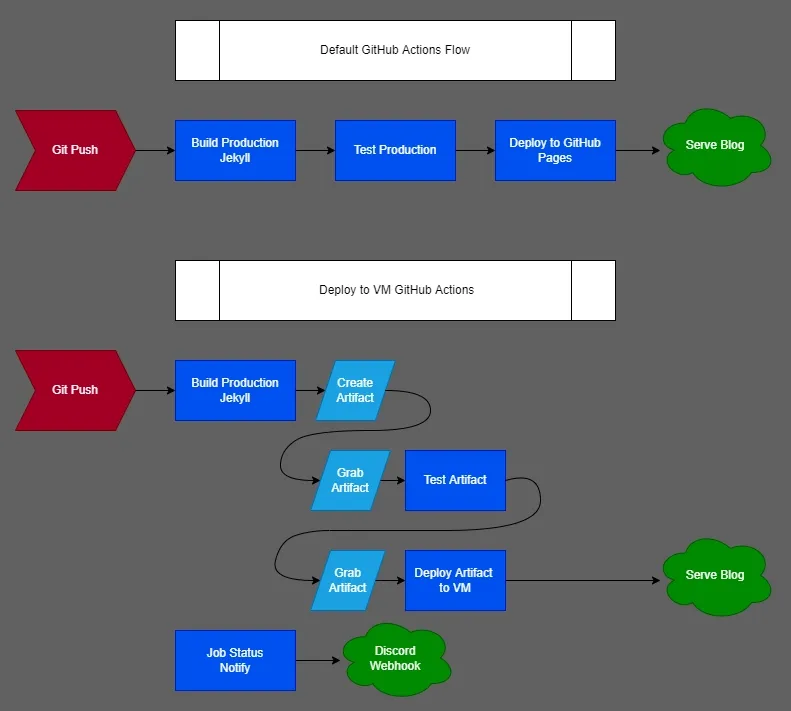
If you want to use the actions file below you will need the following items completed beforehand.
- Cloned / Setup a Jekyll blog in a repository on GitHub.
- Have a VM running that is accessible by SSH from the internet (WAN).
- I recommend Linode if you are just starting out.
- Have a user account created on the VM for actions to log into via SSH.
- You can check out my post, here, which details this process.
- Have a domain registered and pointing to the public (WAN) IP of the VM.
- Have a web server installed and setup to serve from the directory the blog will be in.
- I am using Caddy to serve the blog directory.
- Repository secrets setup:
- LINODEFINGERPRINT = ssh host fingerprint
- LINODEHOST = hostname/wan ip of the VM
- LINODEUSER = username actions needs for login
- LINODESSHKEY = ssh private key for above user
- DISCORD_WEBHOOK = text channel webhook url. Only needed if you use the notify job.
GitHub Actions workflow for deploying the Jekyll blog:
name: 'Deploy Blog'on: push: branches: - main paths-ignore: - .gitignore - README.md - LICENSE workflow_dispatch:
jobs: # build and create the jekyll blog artifact # include 'skip ci' in commit message to not run this workflow build: if: "github.ref == 'refs/heads/main' && !contains(github.event.head_commit.message, 'skip ci')" runs-on: ubuntu-latest steps: - name: checkout repo uses: actions/checkout@v2 with: fetch-depth: 0 # for posts's lastmod - name: setup ruby uses: ruby/setup-ruby@v1 with: ruby-version: 2.7 bundler-cache: true - name: build production env: _config: _config.yml _baseurl: run: JEKYLL_ENV=production bundle exec jekyll b --incremental - name: copy required files run: | cp -r _data _site/data cp -r _plugins _site/plugins cp -r _tabs _site/tabs cp _config.yml _site/config.yml - name: upload blog uses: actions/upload-artifact@v3 with: path: _site/* retention-days: 1
# grab the build artifact and test it using htmlproofer test: needs: build runs-on: ubuntu-latest steps: - name: download blog uses: actions/download-artifact@v3 with: name: artifact path: _site/ - name: test production site uses: chabad360/htmlproofer@master with: directory: "_site/" arguments: --disable-external --check-html --allow_hash_href=true
# grab artifact if test job is successful and deploy it using rsync deploy: needs: test runs-on: ubuntu-latest steps: - name: download blog artifact uses: actions/download-artifact@v3 with: name: artifact path: _site/ - name: run: | mkdir ~/.ssh touch ~/.ssh/known_hosts echo ${{ secrets.LINODEFINGERPRINT }} >> ~/.ssh/known_hosts - name: deploy blog uses: burnett01/rsync-deployments@5.2.1 with: switches: -avr path: _site/ remote_path: /opt/sites/blog/ remote_host: ${{ secrets.LINODEHOST }} remote_port: 22 remote_user: ${{ secrets.LINODEUSER }} remote_key: ${{ secrets.LINODESSHKEY }}
# use nobrayner/discord-webhook action to notify status. # delete this job if you do not want to use it. notify: name: notify runs-on: ubuntu-latest needs: - build - test - deploy if: ${{ always() }} steps: - name: send notif discord uses: nobrayner/discord-webhook@v1 with: github-token: ${{ secrets.github_token }} discord-webhook: ${{ secrets.DISCORD_WEBHOOK }} include-details: 'true' color-success: '#7ED321' color-failure: '#D0021B' color-cancelled: '#9013FE' avatar-url: 'https://octodex.github.com/images/Terracottocat_Single.png' title: '${{ github.workflow }}' description: '${{ github.workflow }} was triggered. It returned status: {{STATUS}}'Workflow file for deleting artifacts to save GitHub storage space:
# trigger workflow to run after listed workflows are runname: 'Delete Old Artifacts'on: workflow_run: workflows: [Deploy Blog, Deploy Blog (DEV)] types: - completed
# delete all leftover artifacts since GitHub's lowest retention time period is 24 hoursjobs: delete-artifacts: runs-on: ubuntu-latest steps: - uses: kolpav/purge-artifacts-action@v1 with: token: ${{ secrets.GITHUB_TOKEN }} expire-in: 0 # Setting this to 0 will delete all artifactsCaddyfile example:
{ email email@email.com# acme_ca https://acme-staging-v02.api.letsencrypt.org/directory debug log { output file /var/log/caddy/caddy.log { roll_size 12mb roll_keep 10 roll_keep_for 24h } format json { message_key msg level_key debug time_key ts name_key name time_format wall } }}
(tls) { tls { dns cloudflare {env.CF_API_KEY} }}
blog.alexsguardian.net { import tls root * /opt/sites/blog/ file_server handle_errors { rewrite * /404.html file_server }}This post is merely an example for the GitHub Actions guide series. I actually use the above workflow to deploy this blog from GitHub, so it does work! If you have any questions, or a suggestion, feel free to reach out via a comment or email!