· Alexander · GitHub · 5 min read
GitHub Actions - Automatically Build and Release Binaries
Automatically build and release binaries with GitHub Actions
Welcome to part 4 of my GitHub Actions post series. This part will cover how to build and release a binary version of Caddy from GitHub Actions. In part 1 we got our Actions pipeline up and building a Docker container for our custom Caddy server image. In Part 2 we automated that process to kick off when changes were detected in the parent Caddy image using Diun. And in part 3 we automated updating our Linode VM to pull and re-deploy our updated container image. As this post is the 4th and final part of the GitHub Actions series, make sure to check out the previous 3 parts before trying to follow along with this post!
The Environment
I will be running this series as if you were running on Windows 10/11 with Visual Studio Code installed. Now this series can also be followed fairly easily if you are running on a straight Linux setup or WSL. I am also assuming you have a general understanding of the command line interface and are somewhat familiar with Docker. If you need more help leave a comment below and I will reach out!
Pre-Requisites
You should have these items created and set up before trying to follow this post.
Updating the Pipeline
First thing we need to do is to update our actions.yml file to include the binary building steps. Now this is completely up to you but I prefer to have the binary steps built before doing Docker images. This makes it easier to catch errors during the build process before accidentally pushing a broken image to your registry. Open the actions.yml file in your repo and add the following lines to it.
### This section defines the action ###
# Name of the actionname: Caddy
on: # Allows you to set off the action via a POST request to the GitHub workflow API repository_dispatch: types: caddy # Allows you to manually run the action from inside the Actions tab of the repo workflow_dispatch:
# See https://docs.github.com/en/actions/using-workflows/triggering-a-workflow for more options
### This section defines the job steps for the action ###jobs: build: runs-on: ubuntu-latest steps: # --- # BINARY BUILD / RELEASE # --- # Setup Go - name: Setup Go uses: actions/setup-go@v2.1.3 with: go-version: '^1.16' # Get xcaddy go module - name: Get XCADDY run: | go version go install github.com/caddyserver/xcaddy/cmd/xcaddy@latest # Check out local repo - name: Pull Local Repo uses: actions/checkout@v2 # Build Binaries and set them to executable - name: Build Binaries run: | sh ./scripts/caddybuild.sh sh ./scripts/caddybuild-win64.sh chmod +x caddy # Get the new version of the binary package - name: Get Binary Version id: caddy_version run: | CADDY=$(./caddy version) vr="${CADDY}" echo "::set-output name=version::$( echo $vr | head -n1 | cut -d " " -f1 )" echo "::set-output name=tag_name::$( echo $vr | head -n1 | cut -d " " -f1 )" # Create release in repository and attach binaries - name: Create Release id: create_release uses: softprops/action-gh-release@v1 with: tag_name: "${{ steps.caddy_version.outputs.tag_name }}" name: Binary Update - Caddy ${{ steps.caddy_version.outputs.version }} token: ${{ secrets.GITHUB_TOKEN }} body: | Release notes: ${{ steps.get_release_notes.outputs.html_url }} files: | caddy caddy.exe # --- # DOCKER SECTION # --- # Login to Docker Hub using repo secrets - uses: actions/checkout@v2 - name: Docker Hub Login id: login_docker if: always() run: | echo ${{ secrets.DOCKER_HUB_PW }} | docker login -u ${{ secrets.DOCKER_HUB_USR }} --password-stdin # Build docker image using the Dockerfile - name: Build Docker Image id: build_docker if: success() run: | docker build -f ./Dockerfile -t ${{ secrets.DOCKER_HUB_USR }}/caddy:latest . # Push docker container to Docker Hub - name: Push Docker Image id: push_docker if: success() run: | docker push ${{ secrets.DOCKER_HUB_USR }}/caddy:latest # Deploy Docker Image update to Cloud VM - name: Deploy to VM uses: appleboy/ssh-action@master with: host: ${{ secrets.LINODEhost }} username: ${{ secrets.LINODEuser }} key: ${{ secrets.LINODEkey }} port: 22 script: cd ~/caddy && docker compose down && docker compose pull && docker compose up -dNow create a new directory called scripts in your repository root and add the following two files to it:
xcaddy build --with github.com/caddy-dns/cloudflare --with github.com/caddyserver/ntlm-transport --with github.com/sjtug/caddy2-filter --with github.com/greenpau/caddy-auth-portal --with github.com/caddyserver/transform-encoderxcaddy build --output ./caddy.exe --with github.com/caddy-dns/cloudflare --with github.com/caddyserver/ntlm-transport --with github.com/sjtug/caddy2-filter --with github.com/greenpau/caddy-auth-portal --with github.com/caddyserver/transform-encoderOnce the files are created we can commit and push our changes to GitHub.
git add .git commit -m "Added binary building"git pushThe next time the action runs you should see a new release on your repository with a Linux and Windows binary for Caddy.
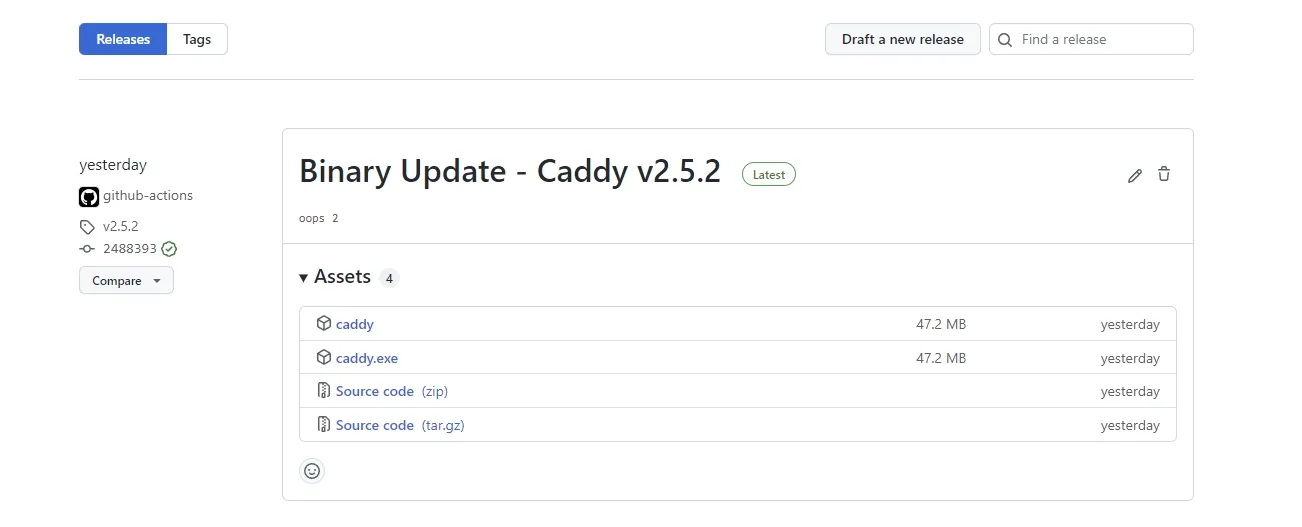 Example of a GitHub release with Caddy binaries
As you can see in the picture above the release was created with both caddy and caddy.exe binaries attached. It also includes a zip/tar of the source code (These archives are a copy of your repository not Caddy’s!). The title was created using the version pulled from the Get Binary Version step in the actions file. I am currently working on pulling the proper changelogs over for Caddy but I’m running into some formatting issues with it. Once I get it working I’ll update this post to include the action steps.
As always if you run into any issues please reach out either via a comment down below or through the email contact!
Thanks to my good friend Stefan for helping proof this post series!