· Alexander · Caddy · 5 min read
Using Caddy's layer 4 module to serve HTTPS and SSH on port 443 for Forgejo
Learn how I deployed Caddy with Layer 4 routing to serve Forgejo HTTPS and SSH access on port 443.

I’ve been running a Forgejo instance in my lab for a while. Until recently all my git work used HTTPS, which was fine especially on personal machines. But work recently moved me to an M4 MacBook Air, and I didn’t want to set up a credential store on it for personal repos. Since I travel occasionally and prefer carrying just one laptop, switching my homelab workflow to SSH made more sense.
Normally it’s trivial: enable SSH in Forgejo, forward a port, and use it in the clone URL if it isn’t 22. For me though, I did not want to open another port on the firewall for this to work remotely. Especially since the default SSH port (22) is constantly scanned on the internet. If you don’t know what Shodan is, let me enlighten you. I figured I’d try and mimic what GitHub does and allow SSH and HTTPS to live on the same port (443). They allow it to get around firewall blocks on port 22 ssh connections. For me at home that’s not much of a problem but, it’s far less predictable if I’m traveling and not on a VPN.
Now trying to mimic GitHub led me down the rabbit hole with Caddy’s layer 4 module. Using the layer 4 module allows you to route raw tcp/udp traffic based on matchers or other custom logic to different services behind Caddy. In my case I needed to multiplex SSH and HTTPS on the same traffic port but forward to two different internal ports.
Building Caddy for Layer 4 Routing
By default, Caddy does not include the layer 4 routing module. It has to be built with it. This can be done using the xcaddy tool with the following command:
xcaddy build --with github.com/mholt/caddy-l4This command fetches the Caddy source code and compiles it with the Layer 4 routing module. The resulting binary can then be used in place of a standard Caddy binary. If you can’t build locally, you can use the Caddy download page to generate a pre-built binary with the Layer 4 module instead.
Configuring Forgejo for SSH
Forgejo includes an internal SSH server that can be used for Git operations. It can be enabled in the app.ini config file under /app_dir/gitea/conf/.
[server]DISABLE_SSH = falseSTART_SSH_SERVER = trueSSH_SERVER_USE_PROXY_PROTOCOL = falseSSH_PORT = 443SSH_LISTEN_PORT = 2240DISABLE_SSH: Set tofalseto enable the internal SSH server.START_SSH_SERVER: Set totrueto start the SSH server.SSH_SERVER_USE_PROXY_PROTOCOL: Set tofalseto disable the use of the PROXY protocol.SSH_PORT: The port shown in the git clone url on repositories.SSH_LISTEN_PORT: The port on which the SSH server listens for incoming connections.
After enabling SSH, Forgejo needs to be restarted for the changes to take effect.
Configuring Caddy for Layer 4 Routing
With Caddy being built with Layer 4 support, the Caddyfile can be configured to route SSH traffic to Forgejo’s SSH server. Below is an example configuration:
{ servers { listener_wrappers { layer4 { # Check traffic for ssh and route it to forgejo:2240 if it matches @ssh ssh route @ssh { proxy forgejo:2240 } route } tls } }}
# Default route for all other trafficgit.domain.com { reverse_proxy forgejo:3000}As you can see under the global section of the Caddyfile there is a servers > listener_wrappers > layer4 section that defines the layer 4 routing listener. All traffic coming into Caddy gets intercepted by this listener. Which then checks for configured routes. If nothing matches the configuration it forwards the traffic to the default route. This listener is waiting for SSH connections (@ssh ssh) and routing them (route @ssh) to the Forgejo SSH server git_server:2240. Anything else gets routed to the default route which is the TLS/HTTPS listener (git.domain.com).
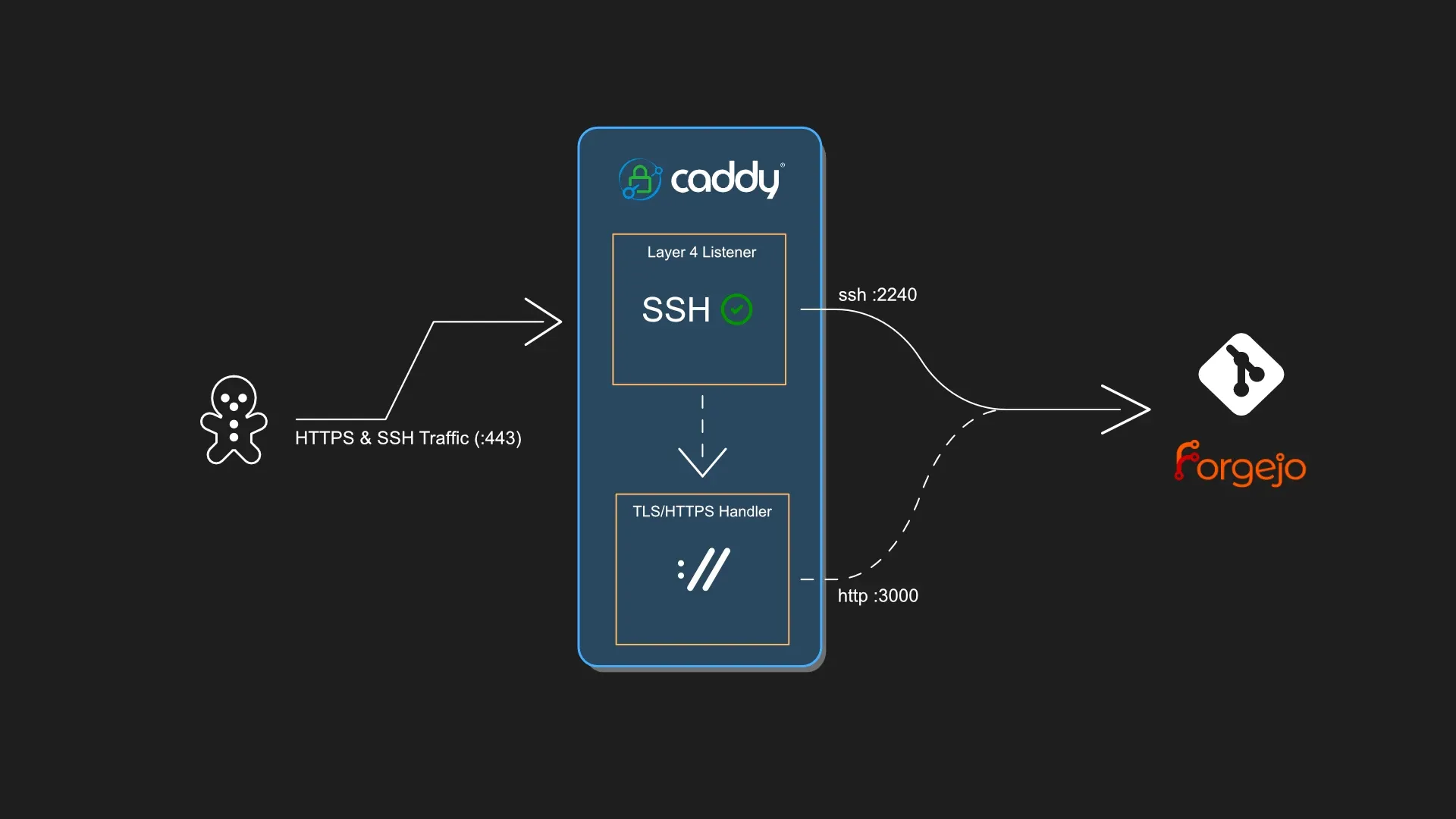 A diagram illustrating the Layer 4 routing setup in Caddy for SSH and HTTPS traffic.
Verifying Connectivity
To verify SSH is connecting over port 443 and being routed correctly to Forgejo’s SSH server is as simple as running:
ssh -T -i ~/.ssh/forgejo_private_key -p 443 git@git.domain.comWhich should return the following:
Hi there, git_user! You've successfully authenticated with the key named forgejo_ssh_user, but Forgejo does not provide shell access.If this is unexpected, please log in with password and setup Forgejo under another user.To make it set and forget, the following can be added to the ~/.ssh/config file:
Host git.domain.com HostName git.domain.com User git Port 443 IdentityFile ~/.ssh/forgejo_private_keyIf you inspect Caddy’s logs you can see the layer 4 routing:
caddy_caddy.2.vs59tc1v3w9g@proximacentauri | {"level":"debug","ts":1757313012.1499827,"logger":"caddy.listeners.layer4","msg":"prefetched","remote":"10.0.0.2:56291","bytes":21}caddy_caddy.2.vs59tc1v3w9g@proximacentauri | {"level":"debug","ts":1757313012.150006,"logger":"caddy.listeners.layer4","msg":"matching","remote":"10.0.0.2:56291","matcher":"layer4.matchers.ssh","matched":true}caddy_caddy.2.vs59tc1v3w9g@proximacentauri | {"level":"debug","ts":1757313012.1507561,"logger":"layer4.handlers.proxy","msg":"dial upstream","remote":"10.0.0.2:56291","upstream":"git_server:2240"}caddy_caddy.2.vs59tc1v3w9g@proximacentauri | {"level":"debug","ts":1757313012.405074,"logger":"caddy.listeners.layer4","msg":"connection stats","remote":"10.0.0.2:56291","read":2757,"written":2792,"duration":0.255775036}caddy_caddy.3.7g08ktgvxfy3@deltacephei | {"level":"debug","ts":1757313013.8432958,"logger":"http.handlers.reverse_proxy","msg":"selected upstream","dial":"git_server:3000","total_upstreams":1}As you can see, the incoming traffic was matched on ssh and then proxied to Forgejo’s ssh server port.
caddy_caddy.2.vs59tc1v3w9g@proximacentauri | {"level":"debug","ts":1757313012.150006,"logger":"caddy.listeners.layer4","msg":"matching","remote":"10.0.0.2:56291","matcher":"layer4.matchers.ssh","matched":true}caddy_caddy.2.vs59tc1v3w9g@proximacentauri | {"level":"debug","ts":1757313012.1507561,"logger":"layer4.handlers.proxy","msg":"dial upstream","remote":"10.0.0.2:56291","upstream":"git_server:2240"}You can also see the web traffic still being proxied to Forgejo’s web server port as well.
caddy_caddy.3.7g08ktgvxfy3@deltacephei | {"level":"debug","ts":1757313013.8432958,"logger":"http.handlers.reverse_proxy","msg":"selected upstream","dial":"git_server:3000","total_upstreams":1}Conclusion
This was a fun exercise for me in the lab and I hope it helps someone else out there looking to do something similar. Caddy’s layer 4 routing capabilities are powerful and can be used for a variety of use cases beyond just SSH and HTTPS multiplexing. If you have any questions or run into issues, feel free to reach out or leave a comment below! If you like the blog consider supporting me via the links on the About page.