· Alexander · Homelab · 17 min read
How I Manage My Media Server From My Phone with nzb360
How I manage my media server from my phone with nzb360. A powerful app for Android that supports Sonarr, Radarr, Lidarr, and more.
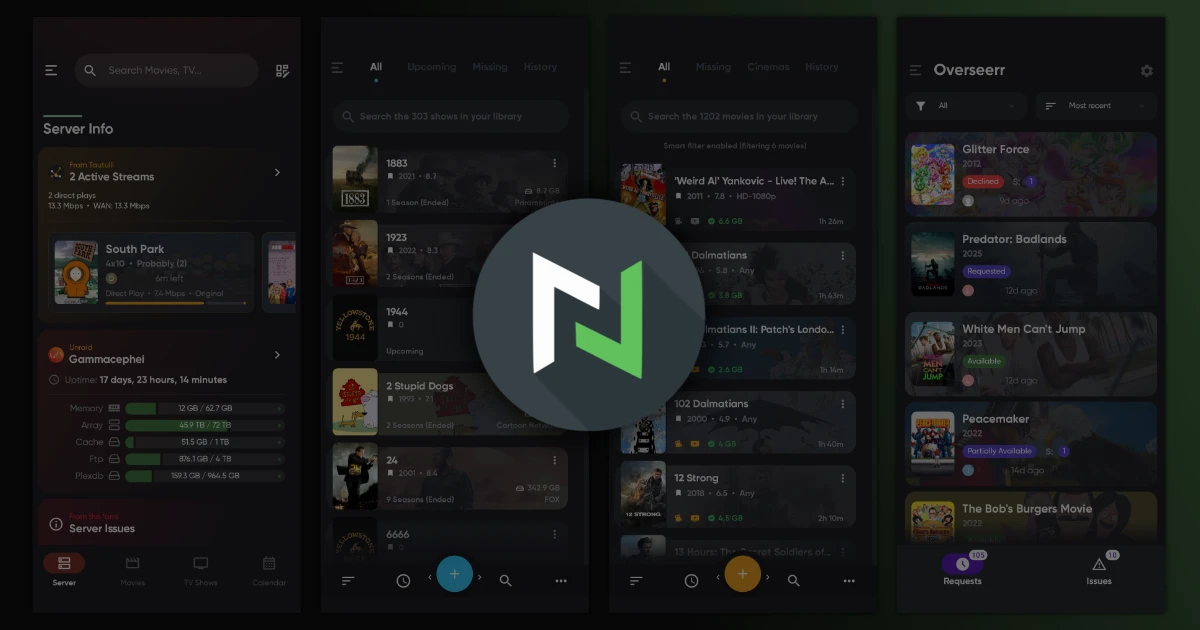
Most people I know who have a home lab started with a small media server. It’s like a gateway drug to homelabbing. At least that’s how I started out years ago. Fast-forward to today, and I have a custom-built unRaid media server that I share with my family as our de facto entertainment hub.
The server is pretty much fully automatic with the help of a few media management apps. My family and I can request new content, and the backend apps will automatically procure it. The best part? I can manage it all from my phone with a single app: nzb360.
On an honest note, before I get into it, I have no affiliation with nzb360 or the developer (besides being a part of the community Discord server). I am not being sponsored to write this. It’s my most-used app on my phone, and recent updates to the app have made it even better. So, I figured it was worth sharing as a post.
What is nzb360?
Let me first state that nzb360 is not free. It has a ‘free’ version, but it is limited in functionality. If you want to remotely manage your media services, you’ll need to pay for service unlocks or subscribe to all-access in the app. I was an original Pro license holder before the recent funding model change, so I have access to all services by default.
With that out of the way, nzb360 is an Android-only app that allows you to manage your entire media server from your phone. It supports a wide range of services, including:
- Sonarr
- Radarr
- Lidarr
- Readarr
- Prowlarr
- Jackett
- NZBGet
- qBittorrent
- Deluge
- Transmission
- rTorrent
- Tautulli
- Overseerr
- Unraid (in beta as of writing this post)
- And more!
It also supports adding other services as web interfaces inside the app.
How I Use nzb360
Currently, my Plex Media Server is hosted as a Docker container on my unRaid server. For anyone wanting specs:
- Intel Xeon E5-2697 V4
- 64GB DDR4 (ECC)
- Supermicro x10SRi-F
- Array: 72TB (5x 18TB. 4x1 parity)
- Cache: 2x 1TB Crucial BX500 SSDs
- Intel x520-DA2 10Gb
- Rosewill LSV-L4500
- Nvidia Quadro P2000 (if only my system would boot the Arc a380 😢)
Anyway back to the app. With my phone I am able to manage the entire media flow for my setup. From manually searching for content in Sonarr or Radarr. To managing media requests or issues from family in Overseerr. And even, with the new unRaid module, managing the service containers themselves. Its like having a swiss army knife for my media server.
Below is a gallery of the app in action. There are a ton more features besides what’s below. To protect the privacy of family members (and make my editing life easier) I only recorded the dashboard as a video. The rest are screenshots of the app.
nzb360 App Screenshots
click/tap to enlarge
The other really cool feature is the ability to use network switching. You can set up two different connection paths for services based on if you are on your local network or remote. This makes it so I can leave the house and the app auto switches to the external endpoint automatically. You can also add HTTP headers to connections. Those come in handy if you use auth services like Cloudflare Zero Trust.
App Monetary Changes
Revenue for the app has always been a challenge. The developer, Kev, has been very transparent about the struggles of maintaining the app over the years. Recently, he made some changes to the funding model to help ensure the app can continue to be developed and maintained. Now this obviously brought on some backlash from users who were used to the old Pro license model. Pro licenses were automatically converted to the newer ‘lifetime unlocks’. Basically a lifetime license to the services developed under the ‘Pro’ era as well as any future updates to said services.
Unfortunately, with development costs rising changing the model to the new ‘lifetime unlocks’ was necessary. The app also now offers an optional subscription ‘All Access’ that provides the same functionality + access to alpha builds to help test new features. For more info you can read the Reddit post from Kev, here.
Final Thoughts
nzb360 has been a game-changer for how I manage my media server. Its unified interface, powerful features, and constant development make it an indispensable tool for any homelab enthusiast with a media server. While it’s not free, the one-time purchase or subscription is a small price to pay for the convenience and power it offers. If you’re on Android and you run any of the supported services, I can’t recommend it enough.

Besides raving about nzb360, I wanted to also have a sit down with Kev (the developer behind nzb360) and ask a few questions interview style. Enjoy!
What initially drew you to software engineering as a career path? Assuming that’s what you do outside of nzb360 development.
I really enjoy consumer electronics and user experiences and have always wanted to improve the products I use on a daily basis or build new things to achieve the user experience goals that I desire. Software engineering is one of those careers where, as a single person, you can design and build a complete product/service from the ground up without requiring a large and diverse set of skills that typical hardware products require. The opportunity that software enables from starting with a concept and being able to develop that concept into a working product and ship that product to users worldwide, as a single developer, is nearly unmatched.
Could you elaborate on the primary motivations behind the creation of nzb360? Was it initially a passion project, a desire to explore specific technical challenges, or something else?
It was primarily born out of my dissatisfaction with the mobile apps at the time for managing the services nzb360 supports. The apps I tried were either not native apps and performed poorly or had UIs that, to me, were cumbersome and didn’t feel “fun” or “delightful” to use.
One of the challenges that I was trying to solve for with the UX workflow of the services nzb360 supports was that each service was their own app, with their own UI and internal workflows. Every service was developed by a separate developer and the entire ecosystem felt very disjointed as a result.
So the idea was largely that a mobile app could really unify these services into a consistent, intuitive, and beautiful UI that made managing everything very easy and delightful on a mobile device.
There was also an underlying opportunity to learn native Android development, which I did find to be a fun technical challenge to try to learn. The idea of trying to unify disparate APIs, services, workflows, apps, etc. into a single unified app and user interface was an opportunity in exploring different app architectures and design to achieve a high-performing and modular experience that would scale nicely to whichever services the user added (or not) to the app. I have never been one of those engineers who loves purely focusing on backend/algorithmic-work, but more on building the entire product experience — but the technical challenges that nzb360 was trying to solve for forced me into figuring out more of the nitty-gritty technical details that overall made me a better developer as a result.
What currently serves as your primary motivation for the continued development and evolution of nzb360?
I satisfied my initial primary motivation for building nzb360 long ago for my own personal use. I only use about 20% of the functionality that nzb360 has today for myself. The vast majority of the features, services, and functionality that I continue to add today is simply because the user base enjoys nzb360 and continues to request new features.
I consider myself very lucky to have built an app that has gained traction throughout the world, that users seemingly enjoy using, and have a built a helpful and supportive community around. Many developers can spend their whole careers building apps that never gain any traction, and so as long as users continue to love using nzb360 and want additional features, I will be happy to continue to develop and maintain nzb360 indefinitely.
Waking up in the morning to a new 5 star review is one of the strongest dopamine emitters for me, as I truly love hearing from users that they enjoy all of the hard work that goes into maintaining a mobile app for over 13 years. It truly is an amazing feedback loop of working hard and seeing the results of that effort. As cliché as it may sound, the amazing user base and community that everyone has helped build for nzb360 is truly what continues to motivate me to continue to develop and evolve the app experience.
From a development standpoint, how would you describe your experience creating applications for Android? Are there any aspects of the development process that you feel could be improved or that you wish were different?
Android (and nzb360) development has certainly been a rollercoaster over the past 13 years. When I first started nzb360, Android didn’t have its own IDE (integrated development environment) and instead used Eclipse with Java and XML layouts to define the UI. Everything was a bit kludgey and required a lot of boilerplate code to achieve even the smallest features. Not to mention, Android has all sorts of different devices, manufacturers, screen sizes, OS versions, UI skins, etc that other mobile platforms such as iOS never has to deal with.
Eventually, Android development began to evolve into making things a bit better, slowly, but surely. First, Google rolled out “Android Studio”, which was a dedicated IDE specifically for Android Development (based on the IntelliJ platform). It was a much better experience compared to the aging Eclipse IDE.
Then, Google and JetBrains introduced Kotlin for Android development, which was a much nicer language to develop Android apps with. However, when Kotlin was released, nzb360 already had 5 years of development and hundreds of thousand of lines of Java code written for it, so migrating the whole app to Kotlin was not really in the cards, especially as the user base continued to want more features. So for all new features, I began to learn Kotlin and write the new services/features with Kotlin, but that also presented a challenge as I had to jump between Java and Kotlin often and re-learn the syntax for each language depending on which area of the app I was working in.
And then more recently, Google deprecated the XML UI layouts that the entirety of nzb360 was developed in with the introduction of “Jetpack Compose,” which is an entirely new way of developing UI for Android apps. As an Android developer essentially since the beginning, learning Compose really broke my brain and took me a bit to get the hang of it. I began building out new features using Compose, which forces a very different code architecture and way to develop UIs, that is very different than the other code I have developed within nzb360 before it.
And then finally, layer in tons of new API changes, OS changes, Play Store policy updates, UI changes from Froyo → Holo → Material 1.0 → Material You → Material Expressive, privacy changes, new form factors (i.e. Foldables, Tablets), etc… it just becomes an insane amount of work just to make sure nzb360 continues to function well across all of these changes.
Of course, with an app as large and complex as nzb360, it hasn’t all been built using the latest and greatest tools. So, while the end user may not realize it, they’re jumping between a sea of different coding paradigms, frameworks, approaches, etc. as they move in/out of different screens. I do my best to ensure everything is a seamless and consistent as possible, but it takes an incredible amount of effort that most users don’t see or realize to ensure that nzb360 continues to function as the Android platform evolves and shifts underneath it.
In terms of what to improve… for me it’s less on the development side, as I am really liking the new Compose framework, but more on the Play Store side. Updates take much longer to review, Google will often reject updates without being very explicit as to why, and you can never talk to a real human to receive support. Apple is much better in this regard and I really wish Google would make it easier for solo/indie developers to thrive, but all of their recent changes simply make it harder for us to build and distribute apps on their platform.
Do you have any memorable or particularly challenging bugs or issues you’ve encountered during the development of nzb360? Any other interesting bugs or issue stories from your broader software development experience?
With so many different devices, OS versions, form factors, user’s complex networking setups, etc. debugging and trying to figure out why something doesn’t work is incredibly difficult. There were quite literally thousands of bugs and weird issues that users would bring up that I had no idea how to even begin solving, as I cannot replicate their complex setups locally. This presented an interesting challenge that ultimately resulted in new a feature I released, dubbed the “Logging Center”, which tries to display what is happening under the hood so I can figure out why things may be failing given each unique user’s setup.
Of course, logging a ton of information is also a privacy concern, so the way I built the logging center was that first, it has to be enabled by the user. Second, the logs are only stored in memory on the user’s device. As soon as you turn off the logging center or close the app, the logs are cleared. They never leave your device.
Users can then send screenshots of these logs so I can get an idea as to what may be happening specifically with their setup. It’s also easy for me to add additional logging where necessary to debug even the most complex issues in the wild.
Given the community interest, what are your current thoughts regarding the potential for an iOS version of nzb360 in the future?
nzb360 is a massive app that has nearly 13 years of development using Android-specific languages, frameworks, etc. While recent features have been developed using Compose, which is now a cross-platform UI framework, the reality of porting nzb360 onto iOS is a very far out concept.
Since I develop on a Windows machine and use Android as my mobile OS, creating an iOS version would require way too much time that I simply don’t have at this point.
However, as more and more of the app is built using Compose, I could eventually see an iOS port that may leave some of the older functionality behind.
We’ll see what the future holds here
As a solo developer, what strategies do you employ to manage your time effectively and maintain a healthy work-life balance while developing nzb360?
Time is the hardest resource to manage, as I also have a full-time job and am a husband and parent to two young kids who require even more maintenance and debugging than nzb360.
Since I am a night owl, the majority of nzb360 development happens when everyone else goes to bed. It’s the time when I feel like I am not taking anything away from my family, and I am only affecting my own sleep. Brewing a cup of tea, turning on some low-key EDM music, and firing up Android Studio late at night is actually a nice way to end the day.
However, writing code is only about 50% of the effort of maintaining nzb360. There is also the support requests via email, updates to the Play Store I have to fill out, responding to threads on Reddit, or interacting with the community on Discord. I try and get to these when I can without my family feeling like they come second.
Following the previous question. Any advice for newer solo developers?
It really depends on the overall goal(s) that you may have for getting into development. Building and maintaining apps is not easy. It is a never-ending journey of twists, turns, highlights, and lowlights that cause immense elation and frustration at different points in the journey.
Spending months learning a new framework, endless nights building a new feature, getting rejected by the Play Store, and then finally getting your app or new feature out to users… only to receive a 1 star review because a user wants another new feature completely unrelated can be very demoralizing.
Knowing this comes with the territory and realizing this happens to every developer is a helpful form of solidarity. Even with new AI tools like ChatGPT, developing apps for end users is just a very tough thing to do. Most users don’t care that you’re a solo dev — they’re comparing your experience to apps developed by Fortune 500 companies with Billions in revenue and teams of hundreds that work on their apps all day every day with support teams in every major timezone. It’s not a fair comparison, but you will get compared nonetheless.
So given all of that, it’s incredibly helpful to have your goals defined and understood before assuming that it’s all roses and butterflies. “If you build it, they will come” doesn’t really apply here. You can build the greatest app in the world, but there are no guarantees users will find and use your app. There is an (unverified) stat that I read that 0.01% of apps in the Play Store make more than $100 ever. And less than 2% of apps ever reach more than 100k downloads — even when they’re free.
Knowing these stats, ensure that you are trying to solve a problem for yourself. That will be the motivation you need to continue the hardship of solo app dev. If no one else uses your app, no biggie, you have solved your own problem. If you happen to have built something others find useful, as in what I have stumbled upon with nzb360, your goals can shift from personal to extrinsic goals from a user base that you work to build and maintain.
When you receive that first 5 star review of someone appreciating your work, the countless hours, frustration, headaches, etc… make it all worth it and will drive you to build more. And when the inevitable slew of 1 stars come rolling in… well that is what a few glasses of your favorite bourbon can help solve!
Welcome to solo indie dev 😄